Troubleshooting call routing
Last updated: July 2, 2026
Know exactly why every real call was saved, scored, or skipped — and fix your rules in seconds.
As your team scales, real-call routing rules stack up across users, teams, and your whole org. When a call doesn't get scored the way you expected, figuring out why used to mean manually cross-checking every rule. Not anymore.
See how any call was routed. Click a call's label to open a new Routing details panel — it shows the matched scope (user / team / org / default), the behavior applied, the exact rule that won, and the AI's reasoning for the categorization.
Ask AI about a specific call. Hit Troubleshoot this call routing and our Kota assistant instantly explains whether the call was saved, scored, or skipped (including privacy-based skips) — and if a rule should have matched, it tells you which one to adjust.
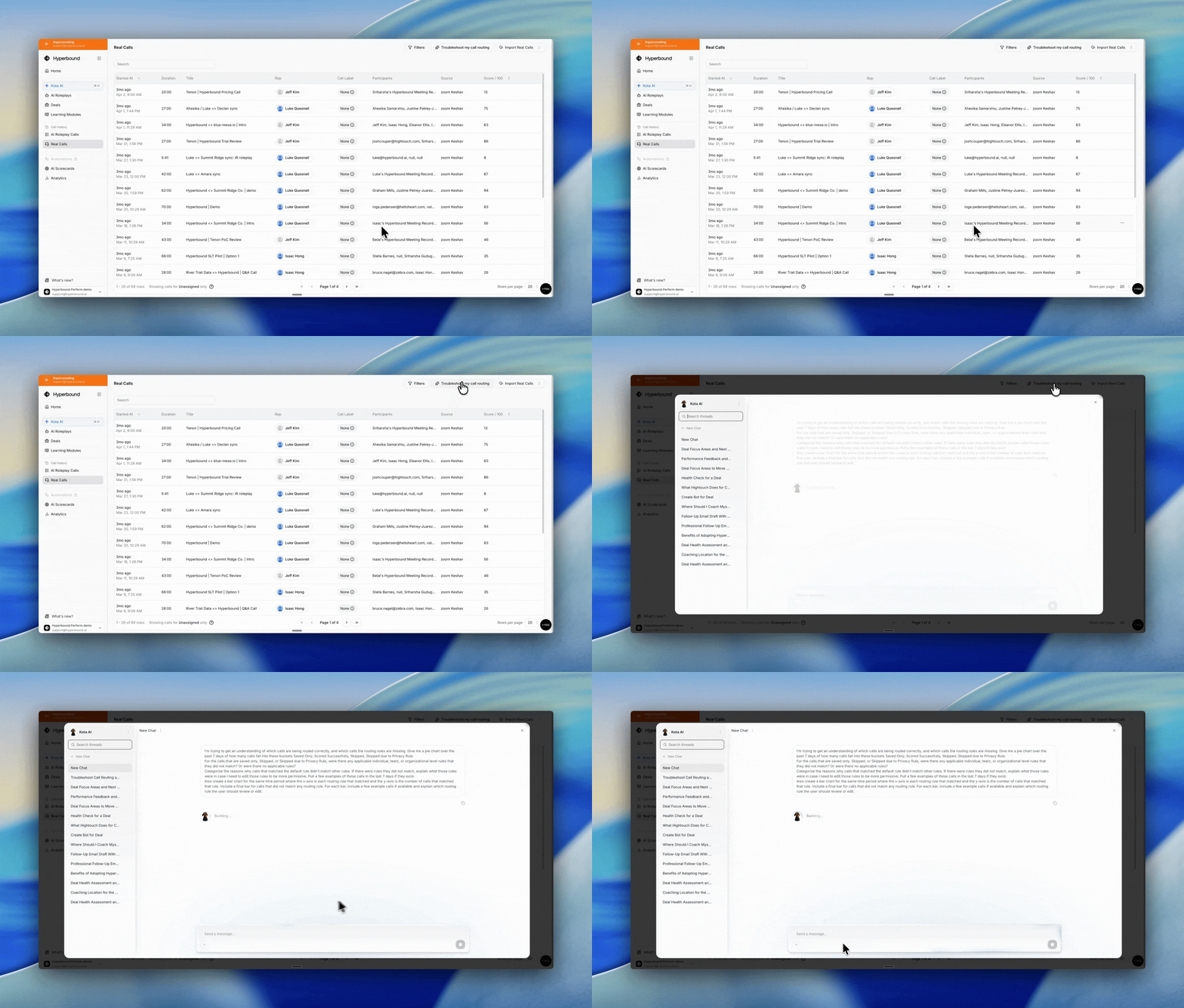
Audit your whole account. Click Troubleshoot my call routing for a 7-day overview: a breakdown of every routing outcome, a chart of how many calls matched each rule, real examples, and clear recommendations on which rules to make more permissive.
Why it matters
Less guesswork — get a plain-language answer instead of reverse-engineering rules.
Higher coverage — quickly surface calls that slipped through and tighten your rules so nothing important goes unscored.
Confident scaling — keep routing accurate as you add teams, reps, and call types.