Kota Knowledge Base: giving Kota your org context
Last updated: November 4, 2026
What it is. The Knowledge Base is where admins tell Kota how your org does things. You add written guidelines, and you can connect apps like Notion or Google Drive so Kota can pull from your own docs.
Why it matters. Without it, Kota builds bots, scorecards and scores calls from general sales best practices.
With it, Kota builds scorecards, bots, and scores calls, the way your team actually sells.
Who can set it up. Admins and Owners only.
Checkout how to write effective guidelines ↗
Where to find it
Open Workspace Settings.
Go to Knowledge Base.
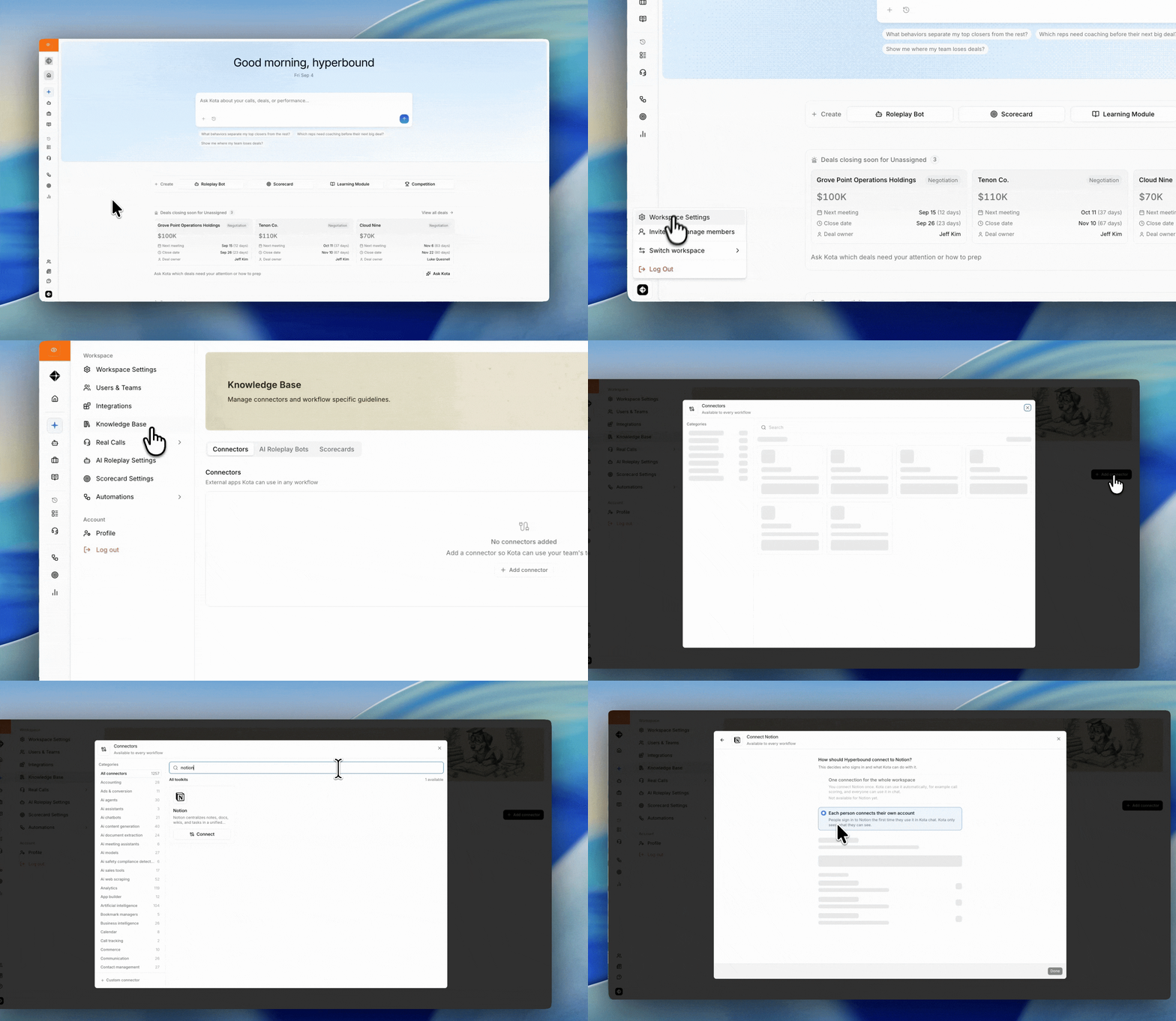
The tabs
The Knowledge Base has a Connectors tab and one tab per workflow. Each workflow has its own guidelines. Editing one workflow's guidelines does not affect the others. Connectors are set up once, on the Connectors tab, and shared by every workflow.
Tab | When Kota uses it |
|---|---|
Connectors | The apps Kota can read documents from, for every workflow below |
AI Roleplay Bots | Someone asks Kota to create or update a bot in chat |
Scorecards | Someone asks Kota to create or update a scorecard in chat |
Feedback | Kota scores a call against a scorecard and writes the feedback |
Part 1: Write guidelines
Guidelines are plain-text rules Kota follows every time it runs that workflow.
To add them:
Choose a workflow tab.
Type your rules in the Guidelines box.
Click Save.
Good guidelines are specific and testable. Some examples:
Reps should not accept a "just send me info" brush-off. Bots should push once before conceding.
Every discovery bot must raise at least one budget objection.
(Feedback) Our sales calls run 45–60 minutes. Feedback must never recommend booking a 15-minute follow-up.
Generate guidelines from your documents
If your playbook already lives in a doc, you do not have to retype it.
Click to add files under Guidelines.
Upload up to 5 documents (PDF, DOCX, TXT or MD).
Kota reads them and drafts a set of guidelines.
Review the draft, edit anything that is off, then click Save.
Nothing is stored until you save. The uploaded files stay listed so you can see what the guidelines were built from.
What guidelines cannot do
Guidelines shape how Kota builds things and writes feedback. They cannot change what Kota is allowed to access.
Rules that try to unlock restricted data, like asking Kota to return scores for private calls, are ignored. The same applies to instructions inside a connected document.
Part 2: Connect an app
Connectors let Kota read documents from your other tools while it works.
To add one:
Open the Connectors tab and click Add connector.
Search or browse by category to find your app.
Select the tools Kota is allowed to use.
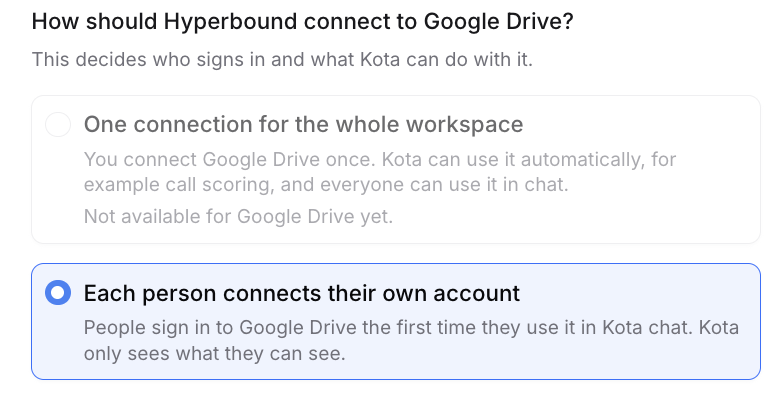
Choose how people sign in.
Save.
An app already connected will not appear in the list again.
Choosing tools
Every app exposes a different set of tools. Enable the ones for finding and fetching documents. If search or read tools are off, Kota connects successfully but comes back with nothing.
Choosing how people sign in
Option | How it works | Best for |
|---|---|---|
Your account (OAuth) | Each person signs in to their own account the first time they use the connector | Apps with per-user permissions, like Notion |
Workspace API key | You enter one key. Nobody else has to sign in | Shared, org-wide sources |
Example:
Part 3: Using a connector in Kota chat
Open Kota chat.
Write your prompt.
Say what you want built
Which document to use
Include what connector you want to use
The first time, you will be sent to sign in to that app. After that you stay signed in.
Be specific. Pointing Kota at a named document is much faster and more accurate than letting it search a whole Drive.
Weak:
/Google Drive build me a cold call botStrong:
/Google Drive build a cold call bot using the "Q3 ICP - RevOps Leaders" doc
Checking sources
When Kota uses a connector, it lists the sources under its response.
Hover a source to see the quoted text it pulled.
Click a source to open the original document.
If a source looks wrong, the fix is usually a more specific prompt or tighter connector permissions.
In Kota chat, connectors only work when you are creating or updating a bot or a scorecard, so say in your prompt that you want to use the connector for that. Scoring uses your connectors separately, through the sources on each scorecard criterion (Part 4).
Part 4: Scoring with the Knowledge Base
Kota can use your org's guidance when it scores calls, in two ways:
Feedback guidelines apply to every AI-scored criterion on every scorecard.
Criterion sources are documents attached to one criterion. They apply only to that criterion.
How it works
When someone saves a scorecard, Kota reads your Feedback guidelines and each AI-scored criterion's sources. It then writes short scoring guidance for each of those criteria in the background. When a call is scored, that guidance goes to the scoring model with the criterion.
Guidance is written when a scorecard is saved. After you change your Feedback guidelines, open each scorecard that should follow the new rules and save it again.
Add sources to a criterion
Open a scorecard and edit a criterion.
Under Sources, click Add source and choose one of the following:
Browse connected apps: search the apps on your Connectors tab and pick a document.
Paste a link: enter a full https:// link.
Upload a file: up to 25 MB. Use this when reps can't open the original link. Save the scorecard first.
Save the scorecard.
Each criterion can have up to 3 sources.
On AI-scored criteria, Kota scores against the sources and shows them to reps with their feedback.
On keyword criteria, sources are shown to reps but are not used for scoring.
A source that Kota could not open shows Couldn't access. Kota does not use it as evidence.
Scorecards made with Generate with AI
When you create a scorecard with Generate with AI, Kota also searches your connected apps for documents relevant to each AI-scored criterion and attaches the best matches as sources (up to 3 per criterion). Review them on each criterion and remove any that don't fit.
What reps see
In a call's feedback, each criterion shows the sources it was based on. Reps can click a source to open it. Sources are not shown on public call share links.
Keeping track of changes
The Knowledge Base is shared across your whole workspace. One edit changes how Kota behaves for everyone.
Each tab shows who made the last edit and what they changed, so you can trace any shift in Kota's output back to a guideline change.
Troubleshooting
What you see | What to do |
|---|---|
Kota ignores your guidelines | Confirm you saved. Confirm you edited the right tab. Bots, Scorecards and Feedback are separate. |
Scoring doesn't follow new Feedback guidelines | Save the scorecard again. Guidance is written when the scorecard is saved. |
A criterion source shows "Couldn't access" | Check that the app is on the Connectors tab and that you can open the document there, or upload the file instead. |
No "Browse connected apps" option | Add a connector on the Connectors tab. The option shows only on AI-scored criteria. |
Connector returns nothing | Check that document search and read tools are enabled for that connector. |
Kota is very slow | Name the specific document in your prompt instead of letting it search everything. |
Rep gets an unexpected sign-in screen | Expected on first use with OAuth connectors. It will not repeat. |
No Knowledge Base in Workspace Settings | Not enabled for your workspace yet. Contact your Hyperbound rep. |
A rule about accessing restricted data does nothing | Guidelines cannot expand Kota's data access. This is intentional. |