Salesfinity
Last updated: March 25, 2026
Learn how to connect Salesfinity to Hyperbound so you can automatically import and score your real sales calls.
Ensure if Salesfinity is enabled in your Workspace, if not, reach out to your SE team
Prerequisites: Real Call Scoring Settings
Before the integration is set up, ensure you have the right Call Routing and Privacy settings for the workspace. Learn more about it here:
1. Generate Your Salesfinity API Token
Go to Salesfinity and log in with your account.
Click your profile icon > Personal Settings
Scroll to the API Access section and click Generate API Token
Copy the token, you'll need it in the next step.
If you don't see the API Access section, your Salesfinity role doesn't have API permissions. Ask your Salesfinity admin to enable it under Admin > Users > Roles.
2. Create the Integration in Hyperbound
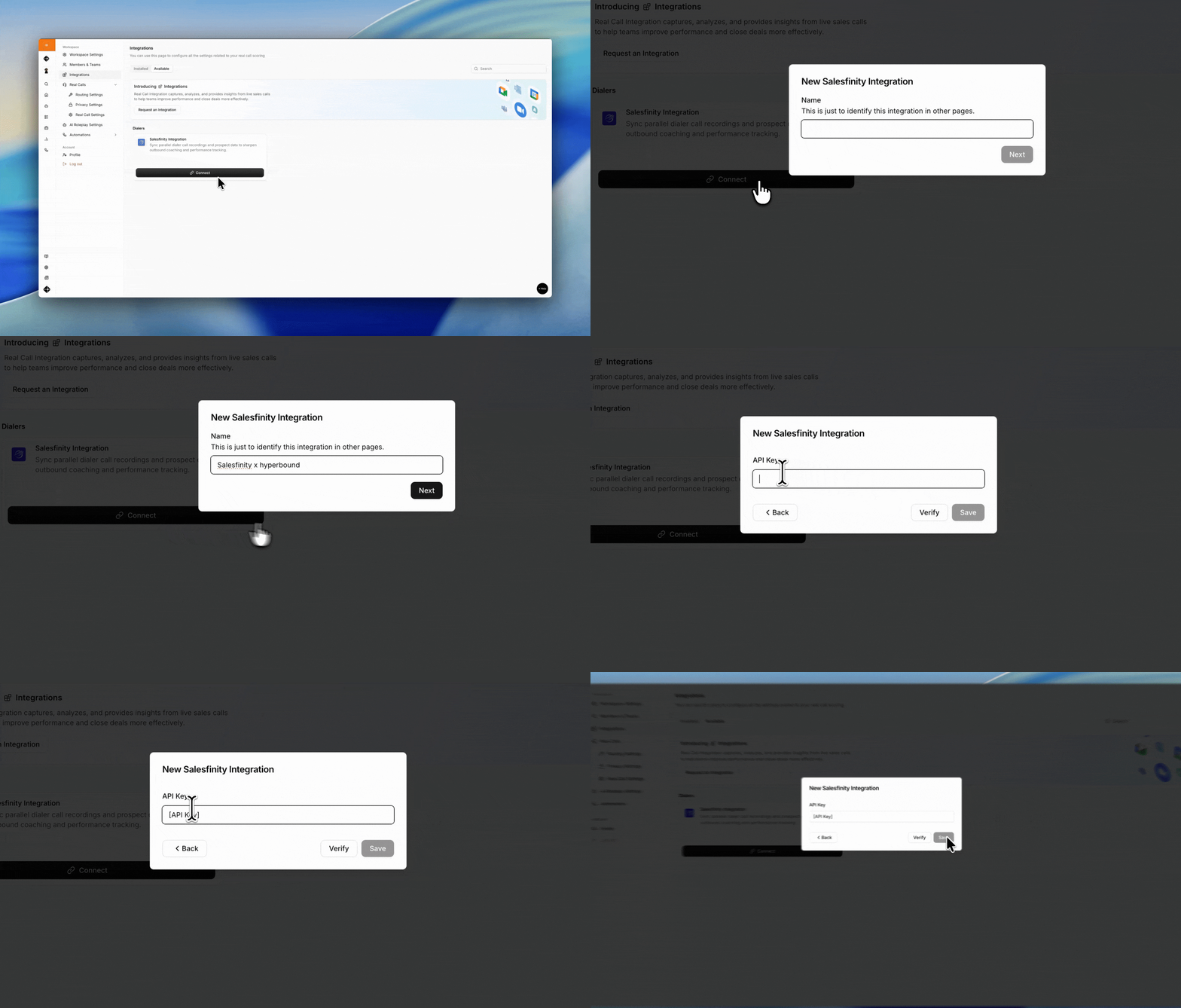
Go to Workspace Settings > Integrations
In the Available tab, find Salesfinity and click Connect
Enter a name for the integration (e.g. "Salesfinity x Hyperbound")
Paste your API Token from Step 1
Click Save
Hyperbound will verify your token. If it's invalid, you'll see an "Invalid API key" error. Double check the token and that your Salesfinity role has API access.
Managing Your Integration
From the Integrations page you can:
Pause: temporarily stop importing calls
Resume: restart a paused integration
Disconnect: remove the integration entirely
FAQs
How quickly are calls available in Hyperbound?
After Salesfinity finishes processing the recording, Hyperbound will pick it up on the next sync cycle (approximately every 2 hours) and score it within a few minutes.
What if my API token stops working?
Disconnect the integration, generate a new token in Salesfinity and reconnect.
Do speaker names carry over?
Yes. Salesfinity imports include participant identification from the original call.
Other Limitations
Salesfinity calls without a recording are not imported
The integration does not backfill your full Salesfinity history. It only imports calls within the sync window going forward
If a call is deleted in Hyperbound, it will not be re imported
Still need help?
Contact support@hyperbound.ai