Running Competitions on Hyperbound
Last updated: May 7, 2026
A complete guide to the participant experience, scoring mechanics, and best practices for driving real engagement.
Overview
Competitions on Hyperbound turn deliberate practice into a measurable, social, time-bound event. Reps make calls against AI-powered bots, get scored automatically, and see themselves move up (or down) a live leaderboard against their peers.
This article covers three things:
What participants actually see and experience, so you can set expectations correctly.
Why each mechanic exists, including the design decisions baked into the product.
How to configure a competition that drives engagement, with practical recommendations and the mistakes to avoid.
If you only have two minutes, jump to Setup Recommendations and Common Mistakes.
Table of Contents
Part 1: The Participant Experience
Part 2: Engagement Mechanics
Part 3: Setup Recommendations
Part 4: Common Mistakes That Kill Engagement
Quick Reference Checklist
Part 1: The Participant Experience
How reps find the competition
Participants access competitions through:
Learning Modules → Competitions tab
The Competitions tab is separate from the standard Learning Modules tab. Reps who are not assigned to any active competition see an empty state: "Once your admin creates a competition, you will be able to access it here."
Important: If a rep is not on the assignee list, the competition is invisible to them. Always confirm the assignee list before launch.
The competition view
Once inside, reps see two tabs.
Tab 1: Leaderboard (default view)
This is where engagement lives. The leaderboard contains four elements:
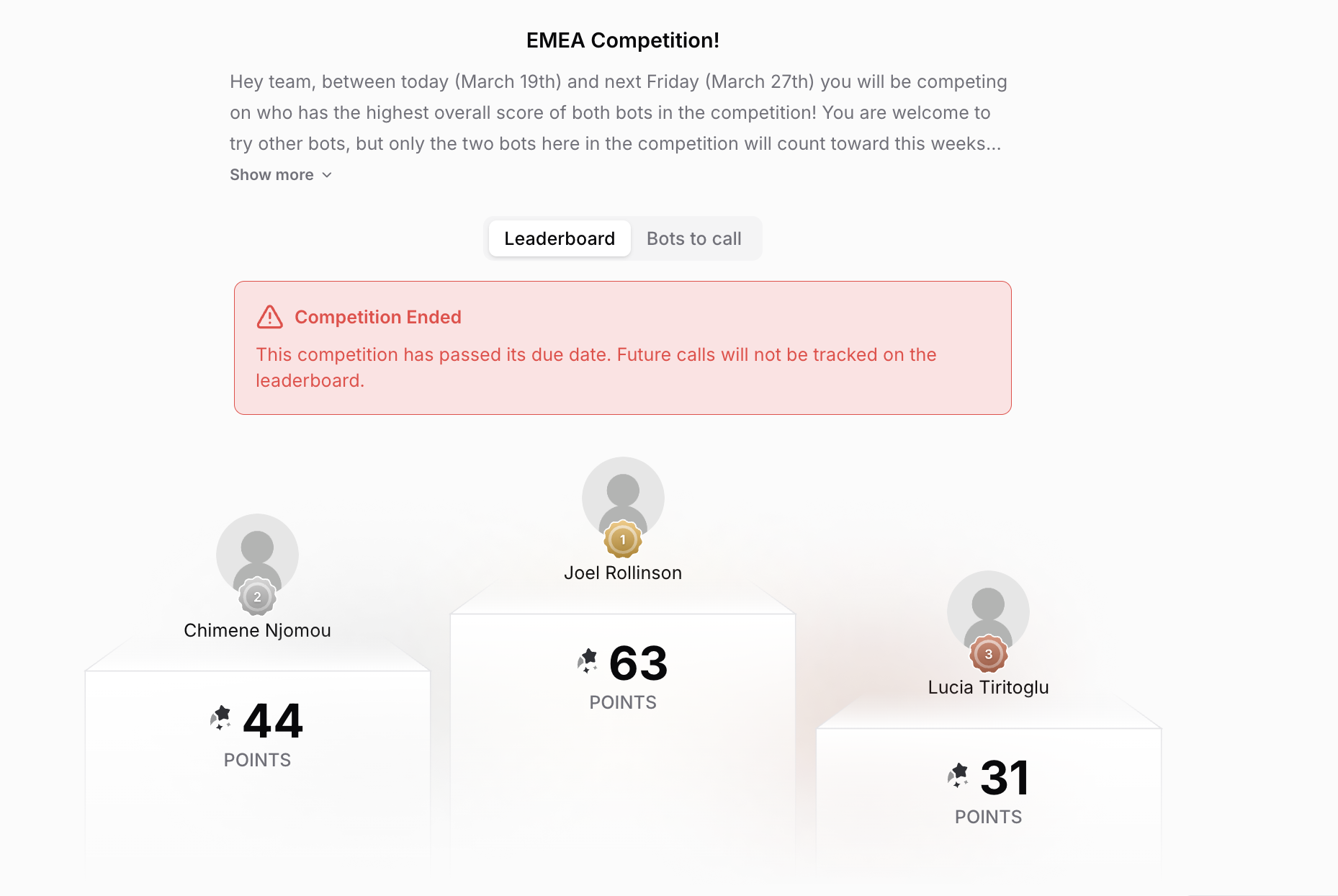
The podium. The top three participants are featured on an animated podium with avatar, name, gold/silver/bronze medal, and score. The animation runs on every page load, which makes winning feel visible and earned rather than buried in a table.
The countdown timer. A live countdown (days, hours, minutes, seconds) to the competition end date, ticking in real time. It sits directly above the leaderboard, so every visit reinforces how much time is left.
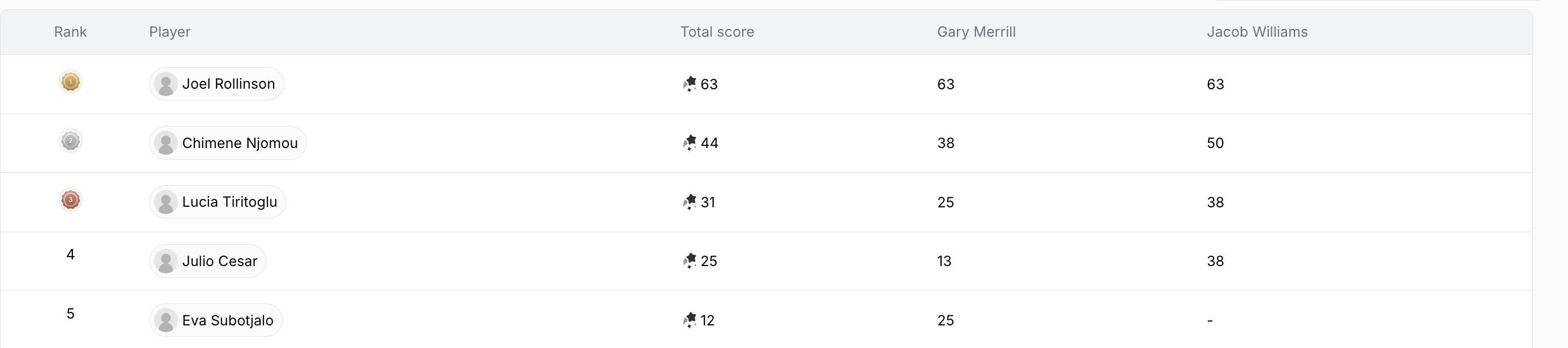
The leaderboard table. Each row shows rank, avatar and full name, total score, and individual scores per bot. The logged-in rep's row is highlighted in teal so they can find themselves instantly. A "My rank: 4" callout appears above the table, and a search bar makes it easy to look up colleagues by name.
Tab 2: Bots to Call
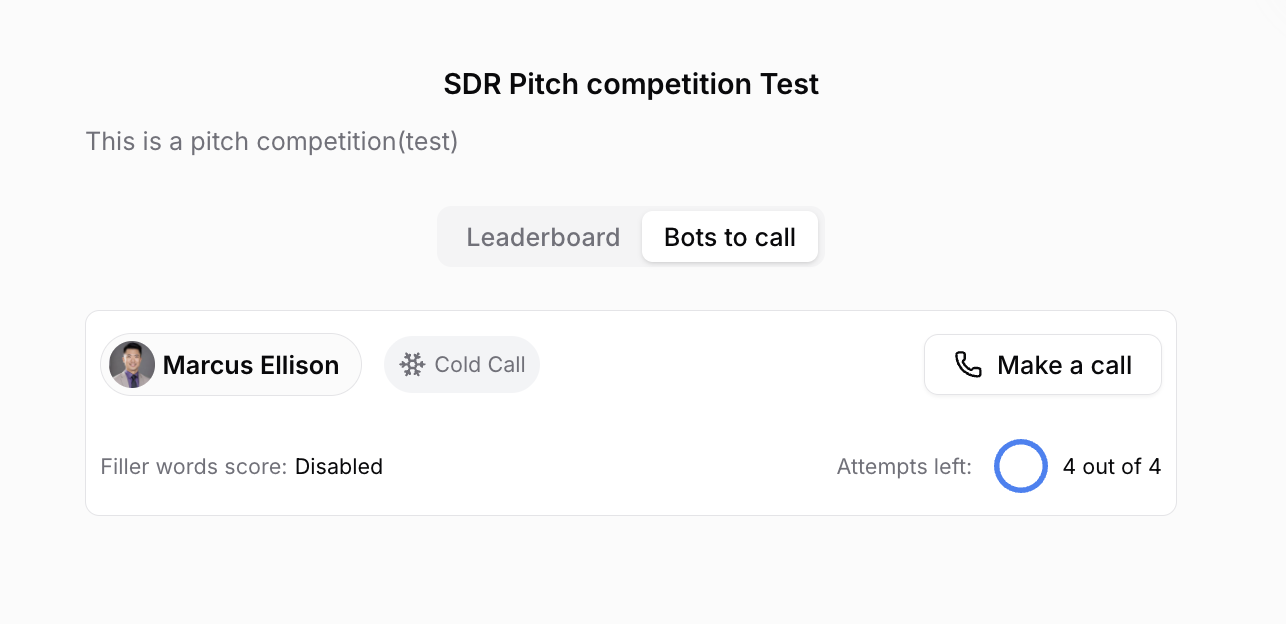
This is the action tab. Each bot is presented as a card with:
Bot name and avatar
Call type (cold call, discovery, etc.)
Attempts remaining, shown as a draining progress circle (e.g. "3 out of 5")
Whether the filler-word tie-breaker is enabled
A "Make a call" button (disabled once the competition ends)
Past attempt history with attempt number, score, filler-word count, and a link to each call recording
When the competition ends
The moment the end date passes:
A red "Competition Ended" banner appears: "This competition has passed its due date. Future calls will not be tracked on the leaderboard."
The "Make a call" button is disabled for everyone.
The leaderboard stays visible and frozen. Winners are permanent.
Part 2: Engagement Mechanics
Each of the following mechanics is built deliberately into the product. Understanding why they exist helps you configure competitions that actually drive behavior.
Limited attempts per bot: scarcity creates urgency
Each bot has a maximum number of attempts (e.g. 5). The system decrements the count on every call; when attempts run out, the call button disappears.
Why it works: Unlimited retries remove stakes. Reps who know they can call 50 times don't prepare, they spam. Limited attempts force intentional practice. The progress circle ("3 out of 5") makes the scarcity visible.
Recommendation: Set 3 to 8 attempts per bot. Too few and reps feel cheated by an unlucky call. Too many and urgency evaporates.
Multiple bots: adds breadth
A competition with several bots (Breakthrough, Explorer, Challenger, Navigator, Closer, for example) requires reps to practice a range of scenarios. The overall score averages across all bots, so specializing in one and ignoring the rest is a losing strategy.
Why it works: It mirrors real sales. Different call types, different buyer personalities. Reps with one strong skill have a ceiling. Multiple bots remove that ceiling.
Recommendation: Design bots around real scenarios your reps face (cold call, discovery, objection handling, demo). Three to five bots is the right range.
The live leaderboard
The leaderboard is public. Real names, real scores, real ranks. The animated podium makes the top three feel celebrated.
Recommendations:
Always share the leaderboard URL. Even for internal competitions, dropping the link in Slack creates organic visibility.
Keep per-bot scores visible in the table so reps can identify which bot is dragging their average down.
The countdown timer: time pressure as a conversion mechanism
The live countdown ticks in real time on the leaderboard and competition home.
Why it works: "Two days left" is abstract. "01:47:23" is immediate. A ticking clock drives action that "end of the week" never will.
Recommendation: Reinforce the countdown in at least three places: the leaderboard, the kickoff email, and a Slack reminder when 24 hours remain.
Best score wins: safe to retry
The system keeps only each rep's highest-scoring call per bot. Retrying never lowers your rank.
Recommendation: Communicate this explicitly at kickoff. Many reps don't realize it and stop after their first decent score out of fear of doing worse.
Filler-word tie-breaker
When two reps have the same score, the one with fewer filler words ranks higher (when enabled).
Recommendation: Enable the filler-word tie-breaker on every bot in internal competitions.
Part 3: Setup Recommendations
Duration
Shorter competitions have higher daily engagement. Longer ones risk reps forgetting about it by day 3.
Attempts per bot
Stay within a 3 to 8 attempts range. Below three feels punishing; above eight removes urgency.
Number of bots
Stick to 3 to 5 bots per competition. This is the sweet spot we see drive the strongest completion rates.
3 bots: fast, easy to complete; ideal for blitz competitions.
4 to 5 bots: full coverage of different scenarios; ideal for broader skill assessment.
Scoring configuration
Enable the filler-word tie-breaker on every bot for internal competitions.
Use different bots for different call types (cold call, warm inbound, discovery) so the leaderboard reflects real skill breadth.
When competitions work especially well
Beyond regular practice cadence, competitions have driven outstanding engagement in two specific moments:
New product launches. Spinning up a competition around a freshly launched product (with bots configured for the new pitch, objections, and discovery questions) gets the entire team fluent on the messaging in days rather than weeks. The leaderboard surfaces who has the new narrative down and who needs more reps.
New team onboarding. Running a competition during the first few weeks of a new hire cohort accelerates ramp. New reps practice repeatedly in a low-stakes, gamified environment, and managers get an early read on each rep's strengths and gaps.
Part 4: Common Mistakes That Kill Engagement
Quick Reference Checklist
Before launching a competition
Assignee list confirmed: no one important is missing.
3 to 5 bots configured, each mapped to a real call scenario.
3 to 8 attempts per bot.
Scorecards configured on every bot.
Filler-word tie-breaker enabled.
Start and end dates both set.
Kickoff message drafted, including leaderboard URL, end date, "best score wins" reminder, and pointer to call recordings.
During the competition
Leaderboard URL shared in Slack at launch.
T-48h reminder posted with current standings.
T-24h reminder posted with current standings.
After the competition closes
Final leaderboard posted in Slack.
Top 3 called out by name.
Recap sent to all participants.