How To: Add Vision to a Bot
Last updated: August 25, 2026
What is Vision?
Vision enables your AI bot to understand and respond to visual content during a roleplay call such as screen shares, slides, or on-screen content. When Vision is active, the bot can see what the rep is sharing and react to it contextually, making demos and screen-share scenarios far more realistic.
Prerequisites
Vision must be enabled for your organization. If you don't see the option, contact your Hyperbound admin or reach out to support to have the Vision feature turned on.
How to Enable Vision on a Bot
Navigate to AI Roleplays section and open an existing bot, or create a new one.
Scroll to the Advanced Settings section.
Toggle on "Add Vision" described as "Allow the bot to understand on-screen or video content."
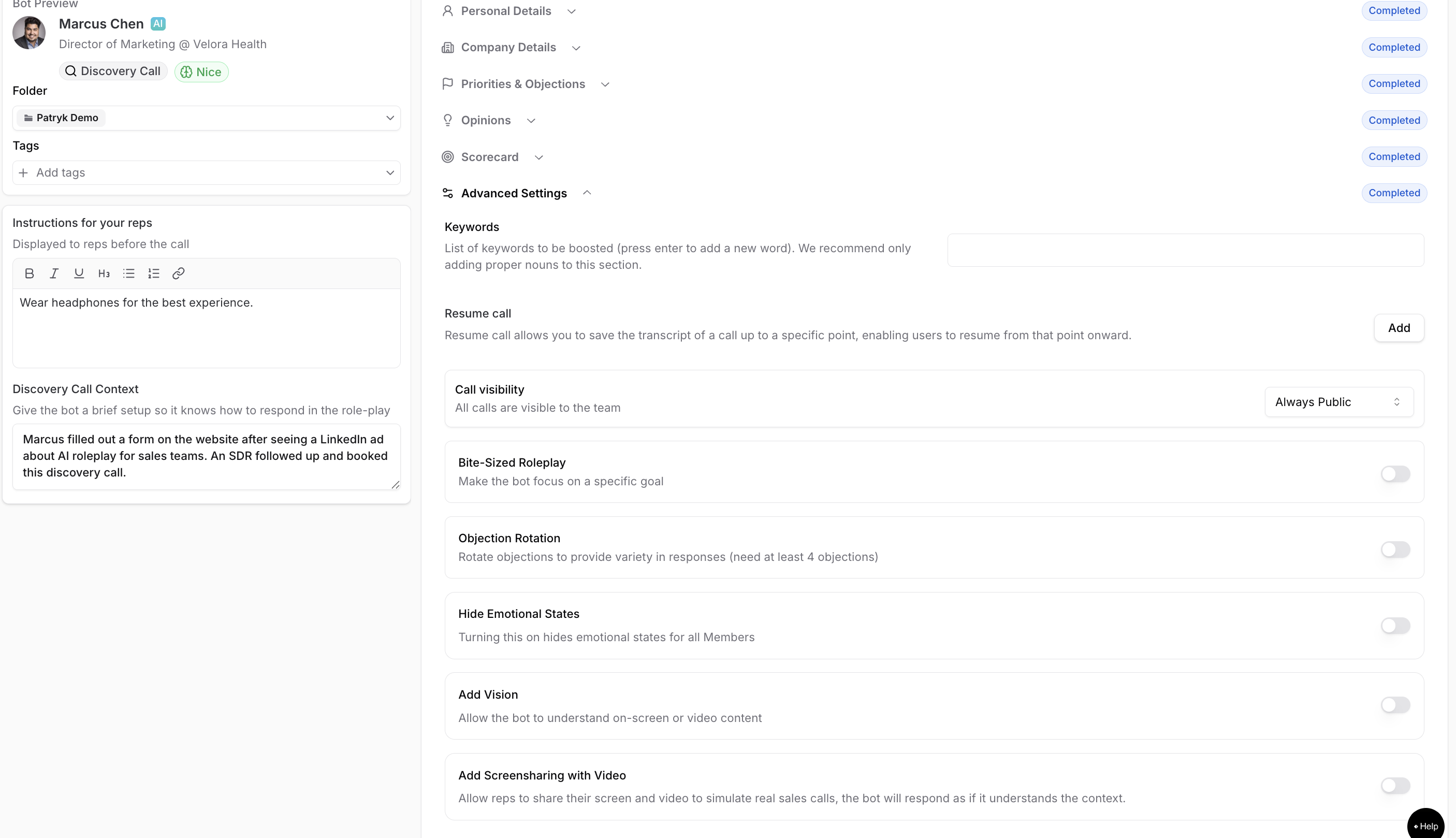

Save the bot.
That's it. Once saved, the bot will automatically use the vision capability.
Important Limitations
Condition Detail | |
Supported call types | Discovery, Demo, Check-In, Renewal, Custom, Manager 1:1, Freight |
Multi-party calls | Vision is not available for multi-party call scenarios. |
Mutually exclusive features | Enabling Vision will disable: Objection Rotation, Bite-Sized Roleplay |